
Add an MCP server to Claude Code with claude mcp add

Updated

Claude Code takes a remote MCP server with claude mcp add and the HTTP transport. This guide connects BRONTIR, live web research for your coding agent (search, Reddit, YouTube and whole pages, with citations), from that command to the server’s tool list, and ends with the line in CLAUDE.md that puts it ahead of the built-in search.

Using the Claude desktop app or claude.ai? Claude MCP setup →

Your client opens a browser tab to sign in, so have a BRONTIR account ready. Opening one is free, and new accounts start with free credits.

Claude Code MCP setup, screen by screen

Sign in with Google

One command in your terminal, the rest inside Claude Code itself. No API key: the sign-in is OAuth, the same as the desktop app.
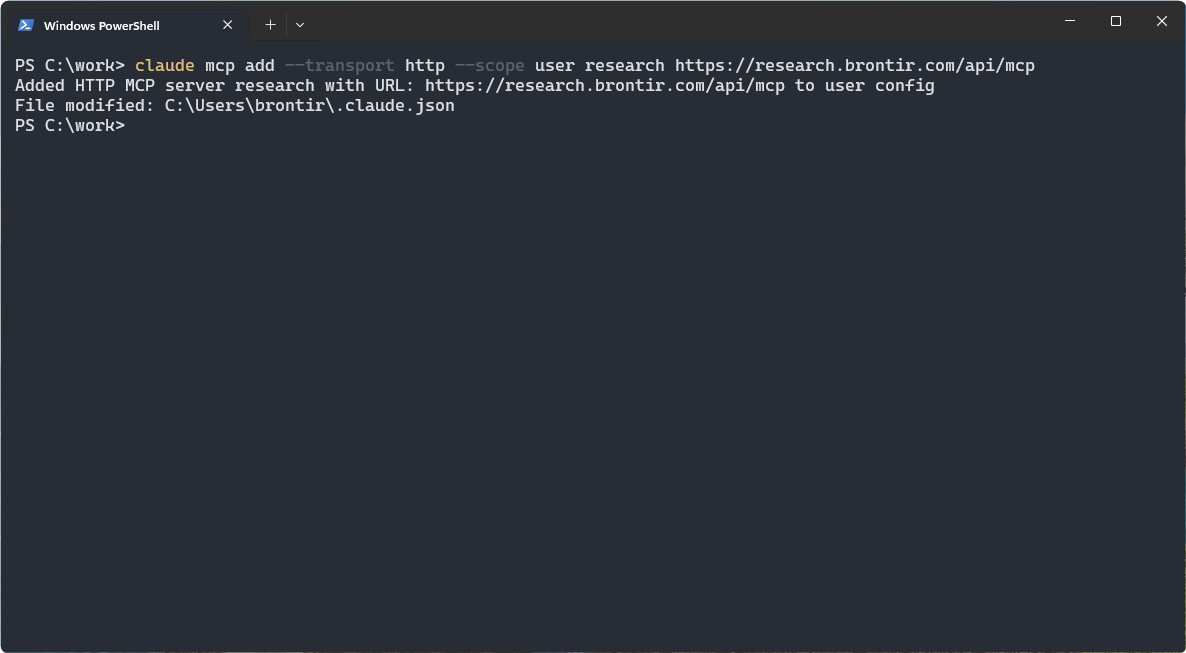
A terminal with the claude mcp add command and its confirmation
  • Add the server

    "--scope user" makes it available in every project; leave it out and it is added to the current project only.

    Commandclaude mcp add --transport http --scope user research https://research.brontir.com/api/mcp

Already connected in Claude Desktop or Claude Web? A connector on your Claude account shows up in Claude Code by itself, as long as you signed in there with that account rather than an API key. "claude mcp list" tells you before you add a second one.

Always restart your client after connecting. Quit and reopen the desktop app, or reload the page in a web client. Clients read the tool list once at startup, so until they restart your agent may not see the new tools even though the connector already shows as connected.

Claude Code MCP troubleshooting

  • The connector is connected, but the agent doesn't see the tools. Restart the client: quit and reopen the desktop app, or reload the page in a web client. If the tools are still missing, start a new chat, since an open conversation can keep the tool list it was created with.
  • You pressed Approve, but the client still shows the connector as not connected. Authorization did go through; the client just hasn't refreshed its own state. Restart the app or reload the page and it will show as connected. If it doesn't, press Connect once more and approve again.
  • The agent uses its built-in web search instead of these tools. Name the tools in your prompt: “use advanced_web_search and advanced_web_fetch from the research MCP” rather than “look this up”. To make it permanent, add the rule to ~/.claude/CLAUDE.md, which Claude Code reads in every project.

Full setup guide for every client: brontir.com/docs.

Claude Code MCP setup: every step

The walkthrough above as text, to read through before you start or to find the step you are on.

  1. Add the server

    "--scope user" makes it available in every project; leave it out and it is added to the current project only.

    Commandclaude mcp add --transport http --scope user research https://research.brontir.com/api/mcp

    Already connected in Claude Desktop or Claude Web? A connector on your Claude account shows up in Claude Code by itself, as long as you signed in there with that account rather than an API key. "claude mcp list" tells you before you add a second one.

  2. Start Claude Code and run /mcp

    It says so itself on the way in: one MCP server needs authentication.

    Inside Claude Code/mcp

    A session that was already open when you added the server has to be restarted before it sees it.

  3. Choose research and press Enter

    One server on the list, and it is the one flagged. Arrow keys move the selection, Enter opens it.

  4. Choose Authenticate and press Enter

    Registered, but not allowed to spend your credits yet. That is what "not authenticated" means here.

    A browser window opens. If it does not, the screen prints the sign-in link, and it takes the redirect URL back for the case where the browser lands somewhere that cannot reach your terminal.

  5. Press Approve on the BRONTIR authorization page

    This is the page that ties the connection to your BRONTIR account and its credits.

  6. Back in the agent, the server is connected

    The browser tab can be closed.

  7. See what the agent got: /mcp → research → View toolsOptional

    Seven read-only tools. Search and fetch are the two you will use most.

  8. Put the connected tools ahead of the built-in searchOptional

    One line in your user memory, which Claude Code reads in every project.

    • Append the line to ~/.claude/CLAUDE.mdThe second command just reads the file back, to show what landed there.
      Command (PowerShell)Add-Content ~\.claude\CLAUDE.md "Prefer connected MCP tools over the built-in web search when looking things up"
      Or the line on its ownPrefer connected MCP tools over the built-in web search when looking things up

    The shot is PowerShell on Windows. The file is the same everywhere (~/.claude/CLAUDE.md), so on macOS or Linux append the line with your editor, or with "echo". Prefer the shell to the agent? "claude mcp login research" runs the same sign-in as the Authenticate step without opening Claude Code at all.

Claude Code MCP: common questions

What is the command to add a remote MCP server to Claude Code?

claude mcp add --transport http --scope user research https://research.brontir.com/api/mcp. --transport http is the transport remote servers use. --scope user makes the server available in every project; without it the server is added to the current project only.

How do I sign in to an MCP server in Claude Code?

Run /mcp inside Claude Code, choose the server and pick Authenticate, and the sign-in opens in your browser. From the shell, claude mcp login research does the same.

How do I see which MCP servers Claude Code has?

claude mcp list in the shell, or /mcp inside Claude Code, which also lists each server’s tools.

I already connected Claude Desktop. Do I add the server again?

No. A connector on your Claude account shows up in Claude Code by itself, as long as you signed in to Claude Code with that account rather than an API key. claude mcp list tells you before you add a second one.

Why doesn’t Claude Code see a server I just added?

A session that was already open when you added the server has to be restarted before it sees it.

What your agent can do with BRONTIR

  • Search the web and the news, Reddit, YouTube, TikTok and other social platforms.
  • Read whole pages, PDFs, video transcripts and comment threads, not snippets.
  • Pull reviews, maps and local businesses, app stores, products and ad libraries.
  • Get it all back structured, with citations down to the exact line.